Showing posts with label APPS. Show all posts

Friday, February 1, 2013

Take a Photo with FaceTime Camera After a Task Finishes in OS X Command Line

 
If you’ve ever wanted to document your reaction to an event, task, or specific command execution, now is your chance to get started. With the help of a fun little app called ImageSnap, you can snap pictures with the FaceTime or iSight cameras from the command line. That can be good enough on it’s own for some uses, but it’s much more entertaining when you tie it to the completion of another command, thereby snapping the reaction to whatever is going on.
Installing ImageSnap is easy:
  • Download Imagesnap and open the tarball
  • tar -xvf imagesnap.tgz
  • Next, cd to the new directory, then copy the imagesnap executable to /usr/local/bin/ (or elsewhere if you prefer)
  • sudo cp imagesnap /usr/local/bin/
  • Refresh or load a new shell for imagesnap to be usable
You can do a quick test by running “imagesnap”, it’s fairly fast acting and you’ll notice the iSight/FaceTime camera light blinks for a moment as the picture is taken. The resulting picture defaults to be named snapshot.jpg.
Now for the fun part, which is attaching imagesnap to the completion of another task, here are a few examples:
Grab your reaction to uptime and load averages:
uptime && imagesnap
Capture the unique look of optimistic worry after an uncertain commit:
git commit -a -m 'No idea what I'm doing' && imagesnap
If you want to actually see your reaction, attach the open command to the end as well:
rm donotdelete.txt && imagesnap && open snapshot.jpg
The default file name is always snapshot.jpg unless it is changed, and the output path is always the present working directory unless it has been specified otherwise.
This can be used in similar ways to Terminal Notifier, except that it’s not actually notifying you of anything and instead it’s documenting your response to events, which can be absolutely hilarious. Have fun!

Credit : OS X Daily

Tuesday, January 29, 2013

Facebook Updates iOS App With Voice Messages, Video Recording And Sharing


fbvoice
Facebook yesterday updated its iOS app to version 5.4, giving users a few new features in what could be one of the world’s most complex and layered mobile apps.
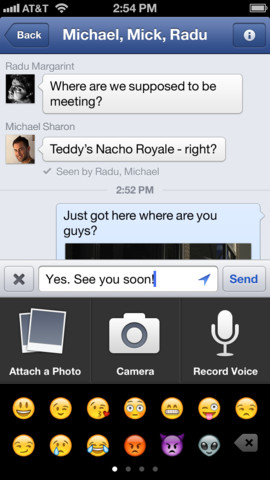
The update brings with it the ability to share voice messages, much like iOS’s Voice Memos, letting users record a cute little message and send it through the app to friends. The update also lets users record and share video from right within the app.
Facebook users have long had the ability to send 60-second voice messages within Facebook’s Messenger app, but the functionality has been brought over to the main app.
Users can send a voice message by tapping the plus button under the Messages tab. From there, click Record and simply hold the button to record your message. When you release, your message will be automatically sent unless you slide your finger off the button, in which case the message will be canceled.
Along with video and voice functionality, Facebook has also improved Places support on the app’s Nearby tab, letting users check in with a bit more accuracy.
Facebook has struggled on mobile, but there have been clear improvements in the past year. The company has introduced various mobile apps like Poke, Messenger, and Camera, while still making clear progress on the main Facebook app. In fact, Zuckerberg believes that mobile is where the money is.
The update is available for free in the App Store.
fbios
Credit : Tech Crunch

Thursday, January 17, 2013

Yelp Partners With Local Authorities To Add Hygiene Scores To Restaurant Reviews, Starting In San Francisco & New York

yelplogo
Governments hold a treasure trove of data that could be helpful to their citizens but they are not always entirely open to sharing the bits and bytes. But initiatives to open up government data have been gathering momentum. More good news today: Yelp is adding restaurant inspection scores to reviews on its business pages, initially for the cities of San Francisco and New York, but with a plan to roll the feature out to other cities where local authorities are open to working with it. Yelp said it has worked with local authorities’ technology departments in San Francisco and New York to import hygiene scores into listings.
The new feature will allow the latest hygiene score to be displayed directly on the restaurant listing — as a number out of 100 (as seen in this example listing below) — and will also allow Yelp users to click through and view the inspection history of an eatery before deciding whether they fancy its steak and fries. The broad point here is that useful government data becomes more accessible to the mainstream web user.
Yelp restaurant scores
Writing in a post on the company blog announcing the news, Yelp said it has created a new open data standard called the ‘Local Inspector Value-entry Specification’, or Lives for short, which ”enables local municipalities to display their hygiene inspection data as a business attribute on Yelp”. Being an open data standard, Lives could also be used by other sites to display restaurant inspection ratings for eateries — potentially widening access to the government data even further.
“We hope other cities will join San Francisco in fully embracing this new open data standard. If you work for a city hall and are interested in learning more about implementation, visit http://yelp.com/healthscores,” Yelp adds.
According to the San Francisco Chronicle, San Francisco will be the first city to get the ratings added to Yelp — due today — with New York following in a few weeks, and Philadelphia expected “soon thereafter”.

Credit : Tech Crunch

Monday, January 14, 2013

Aviation : Delta’s New iPad App Shows Off The World Below Your Plane

Delta Air Lines has released Fly Delta for iPad, an iPad-specific app that, in addition to normal stuff like booking trips and checking flight status, includes a nifty feature they call “Glass Bottom Jet.”


Glass Bottom Jet allows users aboard Delta’s wifi equipped planes to watch the ground pass below as they speed through the sky. It’s not a live view, mind you, but rather a combination of maps and satellite imagery combined with your plane’s current position.
Making use of the iPad’s added display real estate, the iPad-specific app also features new destination guides and trip map features not previously found on the original iOS app. The original, which worked on all iOS devices, has been downloaded 5.5 million times, Delta says.

Delta simultaneously released an update to its iPhone app that integrates with Passbook, the iOS app that will store your boarding passes, movie tickets and store coupons.
“Our goal is to simplify the digital experience across the touch points where our customers already spend their time by making their interactions with Delta easy and intuitive,” said Glen Hauenstein, Delta’s executive vice president – Network Planning, Revenue Management and Marketing, in a statement. “The incredible functionality and innovation found in the new iPad app embodies all that we’re doing to further improve the digital experience customers have with Delta. All of this represents the largest investment to delta.com and digital technology in more than a decade.”


Credit : NY Aviation

Friday, January 11, 2013

Russian Giant Yandex Has Secretly Built A Killer Facebook Search Engine App Codenamed “Wonder

Yandex Wonder Facebook App Logo
Yandex, the Google of Russia, has built a voice-activated visual search engine for Facebook. Codenamed “Wonder,” the mobile app lets people ask what businesses friends have visited and what content they’ve consumed, sources confirm. The question is if Facebook will permit the app. Its policy prohibits use of its data in search engines without permission, and Wonder resembles Facebook “Nearby.”
I talked to multiple industry sources who’ve seen Wonder first-hand or currently have a build of it on their iOS device (though an Android version may have been developed, too). The logo you see above is my attempt at an artist rendition of what sources say an early version of the app’s logo looked like. One source said Wonder is “about more than Facebook” which means it could pull in more traditional search results, or just make use of data from the partners I detail below.
A Yandex spokesperson said Yandex “can’t confirm and can’t comment” on Wonder. However, they did admit that “Yandex is working on mining social data. We are building social products.” It also noted it would have an announcement to make on that front in the coming weeks or months, which could certainly be a reveal of Wonder.
Here’s a rundown of how an alpha version of Wonder worked, but note that some design and partnership details may change if it’s released.

Welcome To Wonder

Wonder users can search using voice for things such as “restaurants in Los Angeles my friends have visited.” A horizontal, tile-by-tile scrolling interface lets them view one at a time the restaurants where their Facebook friends have taken photos or checked in. Wonderers can also type to search instead of using voice, or ask to see where a specific friend has gone.
Clicking on a business shows a horizontal stream of photos and recommendations of that place posted by their friends. Another tap brings up Foursquare-powered venue info such as a map, address, and phone number.
Wonder isn’t just for local businesses like Facebook’s recently launched “Nearby” feature built by the acquired Gowalla team. Wonder can pull up music that friends have listened to, let you learn about artists thanks to Last.fm-powered profiles, or preview or buy songs from iTunes. There’s a news discovery component, too. You can see news articles recently read by all your friends or a specific friend and read them within the app through an internal browser.

Yandex’s Passport To The USA

Yandex Maps AppYandex has largely limited itself to Russia and Russian-speaking markets over the years — a market where it is currently the largest search provider. But its share in its home market has come down and been hovering around 60 percent in the last year with competition from Google and others, so it is turning to growth elsewhere.
Just as Google has extended into mobile to expand the potential footprint for its advertising network, Yandex has done the same.
Chief among those efforts have been Yandex’s moves in mobile. A little over a year ago, it bought a company called SPB Software, which develops cross-platform mobile applications and user interfaces.
Some of projects SPB may have helped Yandex with include apps discovery for music, business listings, taxi services (similar to Uber, with a very popular app in Moscow) and more (this Google Play list includes apps for movie listings, ecommerce, Yandex’s Dropbox-like app Yandex.disc, and Yandex.market for ‘personal shopping’ ). In fact, you could think of these as a composite for some of the features of Wonder.
Perhaps most important of all, are Yandex’s location-based and mapping efforts. Yandex’s maps have replaced Google on iOS devices in Russia, and it also provides the search (but not native maps) on Windows Phone devices in the country. These location-based services might just be Yandex’s passport out of Russia (or so it hopes).

Yandex’s Dream, Facebook’s Nightmare?

So Wonder sounds great, especially compared to Facebook’s internal search engine, which is glaringly deficient. There’s no way to search for news read by friends, searching an artist’s name in the music category returns zero results, and if you figure out how to use the Places tab to search for restaurants, you’re met with standard-looking search results. Finding photos or recommendations of businesses from your friends is tough.
Facebook Search Results Places
Facebook tried to fix some of this with Nearby, and did a pretty good job with the business search. Built into a tab in Facebook’s primary mobile apps, Nearby shows you places friends have been, Liked, or recommended. It took a browse-by-category approach to minimizing mobile typing, in contrast to Wonder’s focus on voice commands. However, Nearby doesn’t surface photos taken by friends at places yet, and it might be better off as a standalone app rather than being buried in Facebook for iOS and Android’s navigation.
The problem is that Yandex’s Wonder may be a bit too great and employ too much of Facebook’s data. In May, Facebook updated its Platform Policies to include the statement “You must not include data obtained from us in any search engine or directory without our written permission.” Facebook tells me this was designed to keep your friends from volunteering your private information to public search engines. But Wonder could definitely be interpreted as a search engine, especially considering its built by Yandex, and the policy doesn’t only apply to private data.
facebook-nearby-map TitledIn fact, Facebook apparently learned that Yandex was developing Wonder around the time it changed its policy, and the line could have been added to protect Facebook’s future endeavors in search from invaders like Yandex. Therefore, Wonder might get its public Facebook data access shut down if it doesn’t have permission, and I’ve heard Yandex is actually worried this will happen pre- or post-launch.
CEO Mark Zuckerberg himself explained at TechCrunch Disrupt SF that Facebook is getting into search:
“Search is interesting. I think search engines are really evolving to give you a set of answers…’I have this specific question, answer this question for me’. Facebook is pretty uniquely positioned to answer the questions people have. ‘What sushi restaurants have my friends gone to in New York in the last six months and Liked?’ These are questions that you could potentially do at Facebook if we built out this system that you couldn’t do anywhere else. And at some point we’ll do it. We have a team working on search.”
Facebook Nearby, since it launched, could answer that sushi question, but so could Wonder thanks to Facebook’s data. With local business discovery comes lots of opportunity for monetization through sponsored placement and other channels. Facebook may not want some other company cashing in on this.
There is hope, though. Facebook struck a status update licensing deal with Yandex in 2010 to allow public posts from Pages to appear in the Russian search engine. In exchange Facebook got a widget on the Yandex home page that helped it sign up Russian users when it was still fighting off local social network VKontakte. Russian news outlet Ria Novosti also reported that Zuckerberg visited Yandex’s headquarters in Moscow in the Fall and held talks with management there.
Perhaps Facebook and Yandex could come to some sort of partnership around Wonder, such as a revenue share or allowing it to use Facebook data in exchange for more promotion of Facebook on Yandex. Other possibilities include Facebook buying the app from Yandex, cloning it the way Facebook copied Snapchat to build Poke, or working out a larger deal where Yandex assists Facebook with its search strategy. If Facebook was really feeling generous, it could just give Yandex permission to use the necessary data in Wonder.
No matter the outcome, sources say Yandex has proven there’s wondrous potential for Facebook in mobile search.
[Additional reporting by Ingrid Lunden]

Company: Yandex
Website: yandex.ru
Launch Date: September 23, 1997
IPO: NASDAQ:YNDX
Yandex is an internet technologies company that operates in Russia, CIS and Turkey. It is the largest Russian and fifth-largest world internet search engine. Yandex is an acronym for the phrase Yet Another Indexer. As of December 2011, Yandex had 60.9% of the Russian search market (source: LiveInternet.ru). Yandex™s mission is to give the answer to the user anytime and anywhere. Company provides its services for desktop and mobile users and develops embedded solutions as well. The company specializes on highly-targeted sophisticated...
Credit : Tech Crunch

Monday, January 7, 2013

Rides : Ford Adds New App For Drivers to Share Their Location

Ford Adds New App For Drivers to Share Their Location
Today, January 7th, Ford announced at the Consumer Electronics Show in Las Vegas several new applications for its customers.
Ford joined hands with technology company Glympse and created a new app which allows the automaker’s customers to share their location by using the vehicle’s Sync voice command. The app is called Ford’s Sync AppLink and makes compatible smartphone app such as Glympse.
“People typically share their location while in the car,” said Glympse CEO Bryan Trussel. “We’re providing drivers with a rich, real-time and hands-free way to share where they are.”
Customers can use the app after they have downloaded it onto their smartphone so that the vehicle will recognize the phone when it is connected to the car by Bluetooth or USB. Drivers can share their location by simply pushing a button on the steering wheel and saying ‘Send Glympse’ via text, e-mail, Twitter or Facebook. The person receiving the Glympse can use their phone said Julius Marchwicki, Ford Sync AppLink program manager.
“We are providing our customers with a dynamic way to share their location while removing the need to take their eyes off the road or hands off the steering wheel to pick up their smartphone,” said Julius Marchwicki, Ford Sync AppLink program manager.

Friday, January 4, 2013

Facebook Adds Voice Messaging To Messenger For iOS and Android


Facebook Voice Messaging
Facebook’s next messaging move is all about voice. Today it released an update for its standalone Messenger for iOS and Android apps that lets users send up to one-minute voice messages. It’s also testing open source VoIP calling between Canadian iOS Messenger users that runs over a user’s existing data plan. Both power hands-free communication between friends, which helps drivers and reduces mobile typing.
The updates to the apps should be available in the app stores later today.

Social Voicemail

Most people hate voicemail so it may seem curious that Facebook is adding voice messaging to Messenger. Even with visual voice mail, many say they simply never listen to their cell phone’s answering machine. But most voicemail is just a longwinded way of saying “call me back.” Facebook sees a new opportunity in making voice messaging a seamless part of a conversation, not a replacement or a bridge to it.
With voice messaging in Messenger, you open a conversation (new or existing) and are shown a red “record” button. Similar to Facebook Poke’s video recording interface, you press and hold the button, talk or record a sound up to one minute in length, and then release the button to stop recording. You can then send the audio message, which appears in the conversation stream as a little wave form that can be listened to. Voice messages will also be available for listening from the web interface.
There are several use cases for audio messaging that text and photos in Messenger can’t cover. For example, if you’re driving, you could record a voice message hands-free to comply with the law but still communicate asynchronously. Sometimes you have to send someone a long message like a complicated set of instructions or driving directions that would be a pain to type. Now you can ramble them off into Messenger.
Facebook Mobile Voice Messaging
[Update: After a little hands on, I think the voice messaging works well. The interface is responsive, audio quality is decent, voice recordings are delivered quickly, and they're instantly available to listen on the web.]
Voice messaging could also be popular for things other than voice. You might record the sound of the lapping waves at the beach, or a clip of a concert. Kids without cellular or data plans might enjoy voice messaging within Facebook instead of having to use third-party apps, such as WhatsApp or Voxer. Voice messaging probably won’t get used too frequently, but it’s a nice addition that makes Facebook Messenger an even more complete app.
Soon I’d expect video messaging to be added. Facebook tells me it has no plans to add voice messaging to its website, as its focus right now is entirely on mobile.
Facebook Voice Messaging

FaceVoIP

Facebook is beginning to test VoIP audio calling in Canada to see if it should bring the feature to the U.S. and perhaps the rest of the world. Canada closely resembles the United States in demographics and usage trends, but is one-tenth the size, making it a smart testing ground. If it gains traction, Facebook will work on how to scale it for a bigger audience and would probably roll it out in the U.S. next, and possibly the web interface.
For now, though, only Canadian users of the latest version of Facebook Messenger for iOS can try VoIP. People can’t VoIP call Android users or people outside of Canada. The feature is a bit buried. Users have to click the “i” icon in the top right of a conversation to reveal a “Free Call” button. It’s not entirely free, though. It will burn data on a user’s existing carrier plan.
Facebook-Voice-Calling
The new VoIP test is not built on Facebook’s existing Skype partnership which powered a briefly available limited test of voice calling on Facebook’s desktop site in January 2011. This indicates somewhat icier relations between Facebook and Skype’s owner Microsoft, which also powers a Bing search integration and display ads on Facebook. If the trend continues, Facebook might also look elsewhere for help with search.
Voice Messaging and VoIP could also be seen as Facebook taking on the default calling app on smartphones. Facebook wants to own social, and that means a lot more than the news feed and profile. Knowing who you’re close enough with to send voice recordings and calls helps it refine its relevancy-sorted content streams, too. If Facebook has its way, eventually you’d only use it for friend-to-friend communication. And with it now showing ads around the web inbox, starting to charge users to contact strangers, and more potential monetization around messages, it makes sense that Facebook wants to kill the phone part of the smartphone
The new updates to Facebook Messenger for iOS and Android are populating in the app stores soon, so if you don’t see the latest update, just wait a little while.

Credit : TechCrunch

Friday, November 16, 2012

What The New Twitter Will Look Like


The  Discover page, full-screen photos and retweet style.
The message from Twitter over the last year has been consistent about one thing: Change is coming. It's building a new Twitter. We sort of joked it would look like this — essentially, more like Facebook — but the new features Twitter rolled out last night show just how true that will be.
Twitter just launched a handful of interrelated things for its mobile apps: a new photo interface, a photo-centric revision of Search and Discover, a slightly tweaked way of denoting retweets, and it built Cards directly into the Discover tab. The result is what you see above, with in-stream photos, a more immersive experience when you click on pictures, and clearer context for retweets that appear in your timeline.
While the new stuff is concentrated within the Discover tab and Search, with the Interaction tab and timeline left mostly untouched, consider that Twitter redesigned the Me tab two months ago. In other words, it may well be sweeping right to left, rebuilding its app one column at a time. When I talked to Josh Brewer, a Twitter designer, he said that the new photo-centric Discover and Search are just "one step toward creating a richer experience," a now-familiar refrain from Twitter.
So now that Me and Discover have been redesigned, what will the new timeline — the main feed — look like in this "richer experience"? Well, probably a lot like Discover does now: with photos and articles displayed midstream, something that more closely resembles a Facebook newsfeed than your current Twitter feed. Remember Twitter's other refrain of late: "consistency." So it makes sense the timeline would look like other fancy new stuff in the Twitter app, or at least fit in with it, visually. And talking to Brewer, it's clear that Twitter is all about photos and these other kinds of media right now:
140 characters is fairly straightforward. In the 140 characters, there's often these links and all the content types you described [photos, video, articles]. How can we make it easier for you to find the great content that people are already sharing?
The thing is, Twitter has always been defined by text. (Even if some of the service's key moments, like the Hudson River plane crash, were photos). So won't showing full-blown photos and article summaries in the main timeline, the way Twitter does now in Search and Discover, kind of break the Twitter stream we know? Well, talking about the changes with photos in Discover, Brewer thinks Twitter found "a way to keep that feeling of a real rhythm in the stream," so "it feels very much like you're in Twitter, not something different."
When I asked him directly about photo overload and all the scrolling you have to do in, say, a Facebook newsfeed, Brewer replied, "At the end of the day people share all kinds of content, and the odds of seeing 50 photos in a row — I'd be hard-pressed to think of a situation where that would occur."
In other words, Twitter has thought about what a very different kind of Twitter stream, one packed with images and articles, will feel like. It thinks you'll be cool with it.
There is obviously still a lot of care being taken with the timeline and what it looks like — the rationale behind the new retweet style for instance, Brewer explained, is that "in your home timeline you've brought these people you follow into your house. A retweet is almost like a guest, and you wanna know who brought this guest into your house."
It's also clear that Twitter doesn't want to go full-on Facebook, particularly with the way it handles photos — one of the biggest points of difference between the two, with Facebook being the largest photo service in the world. Brewer emphasized that Twitter, unlike Facebook, is all about moments, so don't expect being able to upload full photo galleries. Twitter's emphasis on photos, he said, comes down to the fact that "for a lot of other people, photos are the easiest way for them to share what they're thinking and what they're feeling in the moment." It goes beyond language or 140 characters. And Twitter, he added, is "a mechanism for sharing a moment rather than being a photo service."

Credit : BuzzFeed

Thursday, October 25, 2012

How A Company Takes Full Advantage Of Access To Your Facebook Information


When you grant a company access to your Facebook profile, do you think about how it’ll use the info you’ll be handing over on an ongoing basis? Probably not. When you click that Facebook Connect button, you’re probably just thinking, “Awesome, that makes it easier to sign onto that website.” What you should actually be thinking is, “This company may now be mining everything I say and do from here on out to figure out what to sell to me.”
At a conference organized by data warehouse company Teradata this week, one Japanese company laid out exactly how it’s leveraging insights from Facebook to better market to its customers and increase sales. Nissen Co., LTD is a catalog company that sends out over 200 million food, clothing, and consumer good catalogs in Japan each year. “We customize the page content for each customer,” said Shigeru Kakimaru of Nissen’s marketing team. The catalogs people now get in the mail reflect products chosen for them based on their Facebook chatter, though the customers probably don’t realize it.

Through analysis of its customers’ Facebook data, Nissen can incorporate “psychographics” into its marketing. It knows about a customer’s “life stage” (whether they’re married or unmarried, pregnant, dieting, planning a party, etc.) “household” (if they have a child, an aging parent, a pet, a condo, etc.) and “personality” (are they into volunteering, fortune-telling, food, traveling, sports, running, etc?). Apparently, fortune telling is big in Japan?
“Consumers now post a huge amount of data about themselves, their activities, and their feelings,” said Kakimaru through a translator, noting that the amount of information companies can collect will grow in the future thanks to smartphone sensors and NFC technology. “We can learn the life background of our customers — their lifestyle and psychology. We can then target our catalogs accordingly. And we can predict when someone needs a product based on what they say on social media.”
It’s rare to hear a company speak candidly about the extent to which they can mine Facebook once given access by its customers. Perhaps it’s easier to do so when you’re giving a presentation in the U.S. and the majority of your customers are in Japan.

“There’s nothing easier to find from social networking data than that someone has a pet,” said Kakimaru, noting that people with pets tend to talk about them a lot on social networks. He mentioned one test of the company’s methods using a control group of female customers; one group got regular non-Facebook-personalized catalogs for three months while the other group got personalized ones that wound up offering them pet products rather than female apparel and resulted in higher sales.
The company also benefits from the richness of the Facebook social graph and the ability to pull information about its customers’ friends.
“We can see who their friends are and recommend birthday gifts for them based on their interests,” said Kakimaru. “We can relate at an emotional level.”

 The permissions a Nissen app asks for

Nissen gets access to this info for those customers who choose to sign in using their Facebook or Twitter account. A customer who uses Facebook Connect, for example, gives Nissen authorization to download info from their profiles, and get access to their list of friends, profile updates, and photos (depending on privacy settings).” All that info gets sucked up on an ongoing basis and dumped into the company’s Teradata warehouse.
The key to mining the data is “True Teller,” a text mining tool that “turns yarn into gold,” says Nissen tech lead Shinichi Yokote. “Its powerful filtering turns seemingly random data into strategic value. The data from Facebook is useless unless you refine it. You have to drill down through 20,000 or 50,000 data points to find the valuable data.”
Such as you talking about your cat. Or mentioning Nissen. The company “values customers who buy once a year and say positive things about the company on social media more than a person who buys three times a year.”
“It’s important not to overwhelm or alienate the customer,” said Kakimaru seeming to echo Target’s “don’t be too creepy about what you know” mentality.
He mentioned Japan’s strong culture of privacy being a concern for them, giving as an example of the privacy expectations there that people are generally uncomfortable talking too much about themselves. “It is dangerous to overly exploit the information too much now, but we think this will change in the future.”

Nissen fears that a feeling of invasiveness would make customers dislike the company. “That’s the exact opposite of what we’re trying to accomplish by doing this [mining],” said Kakimaru. “Unlike in the U.S. where we would fear being litigated against, we are more concerned about customers being upset by use of psychographics.”
I asked which information Nissen regards as being too sensitive to use for now. Kakimaru says Nissen doesn’t use sexual orientation; relationship status; or a person’s hometown. That last one is a “cultural thing.” “There’s historically been racism based on where you’re from [in Japan],” he explained.
He put religion and political views in the gray zone category.
“We could use these but are steering away for now,” he said. “That’s the same everywhere, right? Best to avoid politics and religion.”

Credit : Forbes Magazine

Friday, September 28, 2012

Tech : How to Use the Panorama Camera to Take Amazing Panoramic Pictures with iPhone


Panorama photo taken from iPhone 5 small

The Panorama camera is one of the better features of iOS 6, it makes taking incredible high-quality panoramic pictures ridiculously easy without adding any additional apps to your iPhone. The feature is currently limited to iPhone 4S and iPhone 5 users, and if you haven’t used it yet here’s what you’ll want to do:

Using the Panoramic Camera on iPhone

  • Open Camera (from the lock screen is the fastest way)
  • Tap “Options” at the top, then tap “Panorama” from the menu
  • Tap the camera button to start taking a picture, then move slowly while keeping iPhone stable as the panoramic image is drawn
  • Finish by reaching the end of the panoramic guide line or by tapping the camera button again
Panorama Camera on iPhone
There is virtually no wait time while the final picture is rendered as a result of how Apple basically “paints” the picture live as the panorama is taken.

Tips for the Best Panorama Photo Results

  • Hold steady and aim to center along the provided line
  • Move slowly horizontally to allow for lighting adjustments as image pans
  • Tap an area of neutral lighting for the initial exposure, avoid exposure lock in dramatically varied lighting situations
  • If you do end up with artifacts and/or regions of black pixels, use Crop directly on iPhone to clean them up instantly
Once Panorama is active, moving slowly and holding steady to “paint” your panoramic photo gives the best results. If you move too quickly the camera won’t have time to adjust properly to lighting changes, and artifacts can appear on the final image either in the form of black pixels for areas that are missed or out of the guide line, or in the form of chunky transitions. You can see an example of the chunky transition artifacting that can occur from a quick motion at the far right corner of this otherwise very nice sample panorama image from an iPhone 5.

Panoramic pictures are stored in the Camera Roll as usual, and you can email or send them through messages as you’d expect. If you want the highest quality version of a panoramic image, you’ll need to connect the iPhone to a computer and transfer the photos by USB, otherwise it will be automatically compressed and reduced in file size and resolution down to somewhere between 5000×1000 and 8000×2000 to save data usage and make it reasonable to open on iOS devices and in email. The original panoramic photos are gigantic, coming in around a whopping 20,000 x 4000 pixels, so be prepared for iPhone storage space to disappear rapidly if you take a lot of these.

Finally, if you have an iPhone 4, iPhone 3GS, or you want to take panoramics with an iPod touch or iPad, an excellent third party app called Dermandar is available for $2 on the App Store.

Credit : OSX Daily

Monday, June 25, 2012

Tech : Never lose your keys again with the Hone Bluetooth keychain for iPhone and iPad


Never lose your keys again with the Hone Bluetooth keychain for iPhone and iPad

The Hone us keychain accessory for iPhone and iPad, now on Kickstarter, that aims to eliminate the problem of losing car, house or any other type of keys. Everyone has experienced the panic -- you're running late, searching for your keys, can’t find them anywhere, time is ticking away... Well, instead of checking and re-checking the same places, over and over again, desperately hoping you somehow missed your keys the first ten times around, the Hone offers a better, more technological solution.
A small Bluetooth device for your keychain, the Hone connects to your iPhone 4S or new iPad via the latest Bluetooth 4.0 low energy protocols. When you lose your keys you just simply fire up the companion app and it will trigger an audible alarm and flashing lights. Even better, it has a built in proximity sensor so if you can’t see you keys, walking around and getting nearer to them will change the way the Hone alerts you too.
The Hone runs for up to six months on one replaceable battery and has a range of up to 150 feet. The makers of Hone will also make the device hackable in the future by releasing the devices UDID and Bluetooth profile. This means that you could hack it and use it for a different solution if you wanted a low energy Bluetooth device for something else.
If you want to get on board with this project, you can be an early adopter with a pledge of $40. The Hone still has 22 days left to run but has already reached its fundng target of $46,000.


Credit : iMore

Thursday, June 21, 2012

Gadgets : Apple’s Siri coming to Chevy Spark, Sonic Within 12 Months


Apple's Siri coming to Chevy Spark, Sonic Within 12 Months

GM is the first automaker to announce support for Apple’s new “Eyes Free” mode for the iPhone, as the Chevrolet Spark and Sonic will be among the first vehicles compatible with Siri.
The two vehicles are already available with MyLink, an infotainment system that integrates with the driver’s smartphone. MyLink leverages the handset’s Internet connection to access a handful of navigation and entertainment mobile applications, such as Pandora, Stitcher, and GoGoLink, and uses Bluetooth connectivity to make and receive hands-free phone calls.
It has roughly 60 commands, which is not that much, but Siri could definitely add a long-list of commands for those who have an iOS device.
Eyes Free should resemble how other hands-free packages work on automobiles. An Eyes Free button will be included on the steering wheel, so users can activate and speak to any iPhone or iPad that is connected over Bluetooth. Siri will do all the processing work.
No word on when we will be seeing this integration, but according to reports (via GM Authority) we can expect to hear more about it within the next 12 months.
9to5 Mac reports that Eyes Free will be part of an entire hands-free package that when activated, will connect through Bluetooth. It’s expected to include some kind of microphone for making quick phone calls that will run through the car’s speaker system.
It’s important to note that Eyes Free just isn’t for the iPhone — it’s also available on the iPad, although you won’t be able to make phone calls.

Credit : Autoblog

Saturday, May 19, 2012

DJ Tech : 4 iOS Tools To Give You An Unfair Advantage In The DJ Booth


Handheld Counter
BPM detection... the old way! Luckily, for the iOS DJ there are better tools to use nowadays that go a lot further than counting beats with a hand clicker.

While I was loading tracks into various iOS DJing apps last week, I started wondering if there were apps that could help DJs work out the key and BPM of any music, not just digital files. Why would this be useful? Well, say you’re playing after a CD or vinyl DJ. Wouldn’t it be good to whip out your iPhone and quickly detect the BPM (and even the key) of the last track played, then effortlessly blend your next track in, perfectly harmonically matched and on the beat, as you take over digitally?
Or, if you’re a DJ who plays some music from digital, but you also use CDs and vinyl, wouldn’t it be nice to quickly “key” and BPM an old vinyl tune for easy mixing into your set, without having to rip it and run it through laptop key and BPM/DJ software? Turns out all of this is possible. Let’s look at some of your options:


Our best four BPM & key apps…


DJ Tempo
A characteristically slick interface on this simple but useful app from Mixed in Key.

DJ Tempo

This is a simple but brilliant app from Mixed In Key to detect the BPM of any background audio.
You can choose how long to give the app for BPM analysis; the longer you select, the better chance you have of getting a more accurate reading.
When you press the “Analyze Tempo” button, a hypnotic, blue circular countdown is displayed, and after your selected period of time (anywhere from five to 20 seconds) a BPM (to two decimal places) is displayed.
Once the app had passed “go” by successfully detecting the easy BPMs on a few house tracks, I decided to throw everything at it including a shuffling live funk number, a sluggish reggae tune and some crazy fast drum & bass. The app was consistently accurate; even the drum & bass tracks were correctly analysed in the 174 BPM region. At a lower time threshold (less than ten seconds) the readings were slightly less reliable, but only on the more extreme tracks.
Seeing as it’s free, this app should be on all DJs’ iPhones / iPod Touch devices. What’s to lose?
Price: Free
Download from: App Store


Beat Control App
Beat Control offers old-school beat-tapping on your iOS device.

Beat Control

This is another BPM detection app which can either take mic input (Auto) or finger tap as the method for calculation. I found the mic input method to be not as accurate as DJ Tempo, however the addition of tap tempo was useful if I wasn’t entirely convinced of the auto reading from this app (or any other, come to that)..
The tapping method is identical to how we used to count BPM manually with vinyl back in the day, but taking out any inaccuracies in counting or timing and doing the calculations. The BPM is calculated to one decimal place – again, not quite as accurate as DJ Tempo.
Price: Free
Download from: App Store


DJ Tools

DJ Tools
With DJ Tools, you're given what you need to manually key and BPM your tracks.

This handy app was developed by a DJ, Pete Simpson, to help with manually keying his own library. While the interface may not be as slick as others, it is functional and if you get lost there’s a helpful guide on Pete’s site.
This app doesn’t actually calculate the BPM or detect the key for you, rather giving you the means to do so. (Its developer points out that auto key detection software often gets the key wrong anyway.)
For best results, you use the app to calculate the BPM first by tapping on the green display near the top. Once the BPM has been detected it is displayed in this section (no decimal place accuracy here I’m afraid).
Now you can use the key buttons below to play out piano chords in selected keys, to try and match the audio from the app to the track playing in the background. (That’s why you should match the BPM first; ideally, the piano chords will play at the BPM you’ve set.)
When a key button is pressed, the main display shows you the key, Camelot code and which keys/codes would mix with the selected key. Having both the key and Camelot code side by side is a welcome comparison, because over time you will probably start to learn the harmonic circle as a result.
If you’re not familiar with harmonic key detection or have no background in music, then this is a good tool to learn from. Incidentally, the app also has a “white-screen” flashlight which may be useful in low-light settings such as a club.
Price: US$0.99
Download from: App Store


Flail

Flail mic detect screen
More musical fun than DJ tool, but it turns out Flail does have a practical application for DJs.

Although at first glance this app may seem a curious choice as a tool for DJs, it does include BPM and harmonic key analysis.
The app is more of a musical play medium than anything else. However, upon swiping upwards on the bottom section of the display and pressing the Key tab you’re shown a mini keyboard, under which is the “get key & BPM from mic” button.
The next screen gives you four guesses as to what the key and tempo could be. By pressing one of the values you get to hear the key in question and then to decide whether this matches the track you can hear in the background. (This video does a better job at showing how you could use the app than a description can.)
You get a small choice of sounds, FX and other settings which make it more of a musical experience than a tool for analysing your music, hence the price difference between this app and DJ Tools. The app could also benefit from some more user help around the mic detection page, which is confusing.
Price: US$2.99
Download from: App Store


Conclusion

It’s not only DJs that some of these apps could be useful for. I can also see them being handy in-pocket solutions for lighting guys, many of whom execute light shows that rely on BPM sync. I am sure many lighting techs would find such apps useful, especially if they’re not close enough to glance over at any readouts of BPM, or to ask the DJ.
I can also see these apps being handy in-pocket solutions for lighting guys, many of whom execute light shows that rely on BPM sync…
One limitation, by the way, is that while iOS apps can currently tell you BPM and key, they can’t do the same for music already on your device and record the findings directly to the audio file. That’s due to Apple’s restrictions on access to those files. Maybe in the future this will change, but right now it’s unlikely anyone will find a way to get around the limitation.
I have to end by pointing out that this is all far cry from those days I spent in the early 90s, scouring the chart pages of DJ Magazine for BPM data of tracks I owned…or even counting the BPM out using a 30-second timer on my watch! How times have changed…

Credit : Digital DJ Tips

Saturday, January 14, 2012

Rides : New Mercedes S Class will arrive in 2013 in six variants

New Mercedes S Class will arrive in 2013 in six variants

The new Mercedes S Class will arrive next year as a 2014 model, but this time the range won’t just consist of a large luxury car – the new S Class is expected to feature six models, including a four-seater cabrio model for the first time.
In addition, the Germans will pull off the luxury Maybach brand by 2013 and replace it with new, more expensive versions of the S-Class. According to Reuters, Daimler CEO Dieter Zetsche said he believes Mercedes has a better chance of selling luxury cars than Maybach.
Most probably, the S600 Pullman will be the replacement for the Maybach brand.
Dr Uwe Ernstberger – Mercedes program manager for the S-Class – told Auto Express at the Detroit Motor Show:
“The S-Class is the best luxury car in the world, and we have many surprises in terms of technology for the new model. It will deliver something very different to its rivals – and it will have a much broader range,” he said.
In addition to the Cabriolet S Class there will be a two-door S-Class coupe, which will be badged as such, rather than use the CL badge of the current car.
Besides a lot new safety features, the upcoming S Class will feature an updated infotainment system called mbrace2 – a platform that was unveiled this week in Las Vegas. The system gives drivers access to a variety of cloud-based apps.
Some of the pre-loaded applications in mbrace2 include Facebook, Yelp, Google, and Street View integration. It also features Internet browsing, news updates and concierge services as well as collision notifications.
mercedes-mbrace2-large
mercedes-new-command-2
mercedes-new-command-1


Thursday, January 12, 2012

Rides : Chevy Spark and Sonic RS get MyLink as standard equipment

Chevrolet MyLink Infotainment System

Chevy is adding some of its latest technology to some of its newest models, with the addition of the MyLink infotainment system in the upcoming 2013 Sonic RS and 2013 Spark models.
Both models will include the same LG Electronics produced touch screen, sized at 7 inches with a color display.
“The whole philosophy of MyLink is about letting our customers personalize how they bring information and music into their vehicles,” said Sara LeBlanc, GM global infotainment program manager.
The automaker did some worldwide research to get a handle on just what consumers would want out of their smartphones in relation to their vehicles to help produce what the brand describes as “safe, simple and connected.”

MyLink works by bringing media from a connected smartphone into the car, providing access to playlists, contacts, and any additional media stored on the phone. All of the information in the phone is organized and displayed via menus on the touch screen.
While Chevy is putting MyLink in the Spark, out this summer, and the Sonic RS, out late this year, the functionality of the system is still a bit questionable, as Chevy notes it will vary depending on the model. The Sonic and Spark RS will not have voice recognition or Gracenotes, for example.

Tuesday, January 10, 2012

Rides : Ford updates Sync Destinations with voice controls, better traffic data

Sync Destinations


Ford is extending its AppLink support to its own Sync Destinations app, finally providing voice control and including more accurate, real-time traffic and rerouting data thanks to its partnership with Inrix.

Surprisingly, you weren't able to access the app through voice commands before, but this latest version of Destinations allows the driver to access all the traffic, saved routes and direction services without having to tap their phone or touchscreen.

In addition to routing to saved destinations, users can send an address from their smartphone directly to the Sync system, get real-time traffic data with rerouting and report accidents, which helps increase the accuracy of Inrix's crowd-sourced traffic information.

The updated app for iPhones will be rolling out soon, but Android users will have to hold out for a few more months.
 
 
Press Release

Updated SYNC Destinations App Connects Drivers to SYNC On the Go, Simplifies Navigation on the Road

· SYNC® Destinations now leverages the power and speed of the latest 3G and 4G mobile broadband networks to provide fast access to turn-by-turn directions, destination downloads and traffic information

· SYNC Destinations is now compatible with SYNC AppLink™, enabling drivers to get quick, on-the-go access to the latest traffic reports, turn-by-turn directions and destination downloads with simple voice commands

· SYNC Destinations is the first of five new apps Ford plans to announce and demonstrate at the upcoming 2012 International CES


DEARBORN, Mich., Jan. 9, 2012 – Ford Motor Company is launching the next version of SYNC® Destinations, its free mobile app for SYNC Services subscribers, giving Ford vehicle owners the ability to easily send destinations to their vehicle using their smartphone.

With the addition of Ford SYNC AppLink™ support, the app enables drivers to use simple voice commands to get on-the-go traffic reports to any of their favorite destination points. Users can report traffic incidents to share with the entire SYNC Destinations community, get to-the-minute incident reports, and leverage their smartphone's data network to download turn-by-turn directions and destinations directly to their vehicle.

"SYNC Destinations is an indispensible tool that cuts travel times and helps Ford owners save money by using less fuel," said Doug VanDagens, global director of Connected Services, Ford Motor Company. "The app not only makes the SYNC experience better, it makes it easier than ever to navigate with SYNC Services."

Simplified voice-controlled access via AppLink
With the first version of SYNC Destinations, Ford owners had the capability to get on-the-go access to their cloud-based SYNC Services account. Drivers could add, save and manage destinations or Saved Points like they do using www.syncmyride.com. Locations added using SYNC Destinations were easily accessible through SYNC Services in the vehicle.

The new version of SYNC Destinations takes the experience to the next level. Now the SYNC Destinations app combines with SYNC AppLink to leverage the power of the smartphone's data connection to download directions into the vehicle using simple voice commands. Users can also access traffic/incident reports while keeping their hands on the wheel and eyes on the road.

Users simply speak the commands "Mobile Apps," "SYNC Destinations," followed by "Traffic to" and the name of a saved destination to instantly get the fastest route to their destination. The command, "Directions," followed by the name of a saved destination enables users to download voice-guided turn-by-turn directions into the vehicle.

Need to know traffic incidents around your location? Simply say, "Incidents around me" to get a report of all known incidents and events around your current location.

Drivers also can use the SYNC Destinations app's community reporting feature to "Report an accident" to other fellow SYNC Services drivers to forewarn them of potential traffic delays.

Ford vehicle owners who do not have AppLink can still download the new version of SYNC Destinations and enjoy the following new features:

· Access real-time traffic information and incident reports covering every major interstate, highway, arterial and city street in North America
· Gather reliable traffic forecasts that cut travel times and save money by consuming less fuel
· Get comparative traffic reports delivering fast insight into which roads are better or worse than normal for that time of day
· View previously unsaved destinations and convert them into a Saved Point
· Access alternate route options to any Saved Points
· Leverage international language support for Spanish, French, German, Italian, Hungarian and Dutch
· Send a destination to the vehicle using the "Send to SYNC" feature via a smartphone. Directions for this destination can then be downloaded by using SYNC Services. Previously, users could only utilize Send to SYNC from their computer or laptop using Mapquest and Google

SYNC Destinations and SYNC Services navigation are powered by INRIX's traffic intelligence platform and the world's largest community of drivers. INRIX uniquely analyzes real-time data from 50 million vehicles and hundreds of public and private sources to provide SYNC owners with voice-controlled access to the latest traffic reports and best routes based on current and expected conditions. INRIX Traffic Forecasts leverages unique analysis of real-time, historical data with analyses of traffic-impacting local events like holidays, weather, concerts and sporting events to deliver insight into what drivers can expect on the roads hours, days and months in advance.

"We continue to collaborate closely with other companies to make sure SYNC and the app ecosystem built around it remains fresh and exciting for our customers," said Srini Racha, product manager, SYNC Services, Ford Connected Service Solutions Organization. "SYNC Destinations gives busy, on-the-go SYNC users the convenience of using their smartphone to find, save and send destinations to their vehicle. Then, when in the vehicle, to leverage the smartphone's power and speed and SYNC AppLink to download directions to that destination using simple voice commands."

This new version of SYNC Destinations continues to be a free download for SYNC Services subscribers and will be available for iPhone users on the Apple App Store. Owners with active SYNC Services accounts can download and use this app. This version of SYNC Destinations will also be made available for BlackBerry and Android users in the first quarter of 2012.

SYNC Destinations now joins the growing SYNC AppLink ecosystem of mobile apps including Pandora, Stitcher, Slacker Radio and OpenBeak. SYNC AppLink is available on 10 vehicles for 2012.

Friday, December 2, 2011

Tech : Apple applies for 'digital handshake' patent powered by invisible ink

Time for the usual disclaimer, since we're taking a journey into the murky world of Cupertino's patent applications -- it's just as likely we'll never see or hear of this tech again as it is to wind up in the next iPhone. While everyone else is betting on NFC, Apple wants to use next-generation cameras and invisible ink to negotiate digital handshakes. Snap a picture of a cash register with a barcode and your iDevice will generate a unique ID to pair up -- but in order to keep the technology secure, the codes would have to be painted on with "invisible" fluorescent coatings. When you're pairing two iPhones (for example) to share contacts, the key could be generated on one of the screens while the other took a picture of it.

Tuesday, November 8, 2011

Cell Phones : Spotify now available for download on Windows Phone

Good news, Windows Phone wielders -- Spotify is now available for your streaming pleasure. The app popped up this morning as a free download on the Windows Phone Marketplace, though you'll need a subscription if you're looking to get premium treatment.

Thursday, October 27, 2011

Rides : Ford Explorer now with Lane Keeping, Coffee Breaks Alert

Ford Explorer now with Lane Keeping, Coffee Breaks Alert

Ford will introduce two new safety features on the new Explorer model: the lane keeping and Driver Alert technology.
The Explorer, which has crossed the 100,000-vehicle sales mark for 2011, will alert drowsy drivers by monitoring the vehicle’s movement compared to lane markings that are tracked by a camera mounted on the windshield.
If the system detects an inappropriate driving style, a first-level chime will sound and a coffee cup warning will appear on the dashboard. In case that the driver will not pull over, and the system will continue to sense the driver is fatigued, another warning and chime will be issued.
According to the AAA 40 percent of Americans, say they have fallen asleep or nodded off while driving.
On the other hand, the Lane Keeping System is designed to help the driver avoid leaving his or her lane unintentionally. This new technology consists of the Driver Alert System, Lane Keeping Alert and Lane Keeping Aid.
If the driver will unintentionally change the lane, a vibration in the steering wheel will occur to naturally direct the driver’s attention to where it is required. This provides the driver with valuable time to react and steer the vehicle back into its lane.


Wednesday, October 26, 2011

Rides : Toyota first to market with MirrorLink functionality in iQ


Toyota MirrorLink


Toyota Touch – the Euro-spec version of Entune – is gaining one more functionality in the Toyota (not Scion) iQ: Toyota Touch Life.

The system is the first to use the Car Connectivity Consortium's (CCC) MirrorLink technology, which can port an exact replica of a connected smartphone's display to the iQ's seven-inch touchscreen.

The first platform supported by Toyota Touch Life comes from Nokia – a key partner in the CCC – and its Car Mode app, which can be download from the Nokia Store for devices running Symbian Belle (which, ironically, is about to be phased out in favor of Windows Phone 7).

Apple iPhone users aren't left out of the mix and will be able to download the Application Launcher app from the App Store, allowing them to access the Garmin StreetPilot app, Stitcher radio and Facebook and Twitter integration through a clean and supposedly distraction-free interface. However, functionality in U.S. models remains an open question, something which should be cleared up in the coming months.
 
Press Release

Toyota Touch Life - world-first smartphone mirroring infotainment product

Toyota introduces the latest addition to the Toyota Touch infotainment product family with the all-new Toyota Touch Life. Offering consumers with unprecedented smartphone-vehicle connectivity, Toyota Touch Life will be available for the Toyota iQ city car towards the end of 2011 in selected markets. Toyota Touch Life uses the latest industry connectivity protocols to mirror the smartphone's display on the infotainment system's 7-inch touchscreen. Smartphone functionalities can now be easily accessed using steering wheel-based controls or the large touchscreen surface.

Nokia smartphone owners can seamlessly connect their devices with Toyota Touch Life using the new industry standard connectivity protocol, MirrorLink™, developed by the Car Connectivity Consortium. This represents an automotive industry world-first deployment of the protocol.

In addition, Nokia smartphone users can also make use of the specially developed Nokia Car Mode app which simplifies the user interface to give direct access to the device's telephony, voice guided, turn-by-turn navigation, and music player functions. This easy-to-use GUI (graphical user interface) ensures that drivers can access only the most essential and non-distracting functions on the smartphone while the car is on the move. The Nokia "Car Mode" app, with MirrorLink™ support, can be downloaded from the Nokia Store for devices equipped with the Symbian Belle (1) operating system. When the car is stationery, Toyota Touch Life allows drivers and passengers to access the complete functionalities of their Nokia smartphones through the in-car touchscreen display. The display supports not only point-and-touch standard touchscreen capabilities but also on-screen scrolling or swiping gestures.

Apple iPhone users (running iOS 4 or later) can download the free "Application Launcher" app from the App Store to connect their devices with Toyota Touch Life. The "Application Launcher" app offers drivers and passengers access to various apps on the in-car display including the Garmin StreetPilot® (2) app (available for purchase from the App Store), internet radio and news apps such as AUPEO! (3) and Stitcher (3), and social networking services such as Facebook and Twitter (4) using the built-in application interface.

Complete audiovisual connectivity to the Apple iPod also comes as standard on Toyota Touch Life, giving users complete access to their music and video collection using either steering wheel-based controls or buttons located on the infotainment system.

Smartphone-vehicle connectivity with the Toyota Touch Life will continue to expand as more mobile communications and consumer electronics companies continue to implement the MirrorLink™ industry standard.

Toyota Touch Life is the latest addition to the Toyota Touch family of infotainment products aiming to offer a new level of in-car connectivity and multimedia experience to a wider range of consumers. The Toyota Touch & Go was recently introduced for the Toyota Verso-S, Yaris and Hilux models. The Toyota Touch infotainment experience will be soon expanded with the Toyota Touch & Go Plus, making its debut for the Toyota Avensis, Prius and Verso, as well as the Toyota Touch Pro for the Toyota Prius.

(1) Nokia Car Mode app with MirrorLink™ support will be available for download on Nokia 701, Nokia 700, Nokia 603, Nokia 600, expanding to include Nokia N8, Nokia E7, Nokia C7, Nokia X7 and Nokia C6-01 models at a later date. Support for Nokia N9 is also planned.

(2) Two versions of the Garmin StreePilot® navigation app are currently supported, including maps for Western Europe and the United Kingdom and Ireland.

(3) AUPEO! and Stitcher apps are subject to regional availability in the Apple App Store.

(4) Application Launcher uses the Twitter API (application programming interface) to access Twitter.